
How to Move Your Kitchen From Paper Tickets to a Kitchen Display System
Moving from paper tickets to a kitchen display system for restaurants is not simply a matter of replacing a printer with a screen. It is an operational change that affects how orders enter the kitchen, how cooks communicate, how managers spot problems, and how the team handles a full rail during a busy service. The safest way to make the change is to roll it out one station at a time, prove that the workflow works, and build toward the first busy Saturday without asking the entire kitchen to learn a new system at once.
Start by fixing the problems you actually have with paper tickets
Before looking at screens, spend a few services observing how tickets move through your kitchen.
Paper tickets are familiar. Cooks know where they go, how to read them, and what to do when something changes. They also create predictable problems.
A ticket can fall behind another ticket, get covered by a handwritten note, or disappear when someone clears a rail. A modification might be written in a way that makes sense to the server but not to the cook. A runner might collect part of an order while another station still has unfinished items. During a rush, the expo may spend more time asking for updates than coordinating the pass.
None of these problems automatically means you need a kitchen display system. They do mean you should identify which problems a new system needs to solve.
Watch three services: one relatively quiet, one typical, and one busy. Write down what happens rather than relying on what people tell you afterward.
Pay particular attention to:
- Tickets that reach the wrong station.
- Modifications that cooks miss or misunderstand.
- Orders that are started too early or too late.
- Items that are ready but waiting for another station.
- Duplicate tickets or orders that never reach the kitchen.
- Time spent asking whether an order has been started.
- Situations where the expo has to reconstruct an order from several pieces of paper.
Separate technical problems from operational problems.
For example, if cooks regularly miss allergy notes because the person entering orders puts them in the wrong field, a screen alone will not fix the issue. You need a clearer order-entry procedure as well.
Your first objective is to define what a successful rollout looks like.
A useful starting list might be:
- Every order reaches the correct station.
- Modifications are visible and understandable.
- Cooks can identify new, active, and completed work.
- The expo can see the progress of an entire order.
- Managers can identify recurring delays.
- The kitchen has a reliable fallback if the equipment stops working.
Keep this list somewhere the entire management team can see it. It will become your acceptance test when you evaluate the system.
Map the kitchen before deciding where the screens belong
A kitchen display system should follow the way your kitchen actually works, not force your kitchen to follow an arbitrary screen layout.
Start with a basic station map.
Imagine a neighborhood restaurant with four working areas:
- Grill: burgers, steaks, and grilled sandwiches.
- Fry: fries, fried chicken, and appetizers.
- Pantry: salads and cold preparations.
- Expo: final checks, plating coordination, and order completion.
Draw the path an order takes from the point of entry to the pass.
Then identify which items belong to each station. A burger with fries, for example, might create work for both grill and fry. A salad might go directly to pantry. A shared appetizer might need to be prepared early enough to reach the pass with the entrees.
This exercise exposes an important implementation decision: whether you need a display at every station immediately.
You probably do not.
For a small restaurant, starting with one station is often easier to manage. Choose a station with a straightforward workflow, consistent order volume, and a lead cook who is comfortable helping train others.
Avoid choosing the most complicated station just because it receives the most tickets. Your first installation should teach you how the system behaves without introducing every possible exception.
Also consider physical placement.
The screen needs to be visible from the working position without blocking food preparation, creating a sanitation problem, or forcing cooks to turn away from their work constantly.
Check:
- Whether the screen is readable from the normal working distance.
- Whether overhead lighting creates glare.
- Whether steam, grease, heat, and splashes could affect the equipment.
- Whether power and network connections are practical.
- Whether the screen interferes with existing shelving or equipment.
- Whether cooks can interact with it safely during service.
Confirm equipment placement and cleaning procedures with the relevant equipment documentation and your applicable local requirements.
A screen that looks good during a demonstration but cannot be read from the grill station is a poor installation.
Choose the first station and define its rules
Your first station is a pilot, not a permanent declaration that the entire kitchen has changed.
Pantry or fry can be reasonable starting points, depending on your menu and staffing. Choose the station where orders are relatively easy to identify and the handoff to expo is clear.
Before switching it on, define four things.
First, what counts as a new ticket?
Cooks need to know what appears when an order enters the station and what they are expected to do immediately.
Second, how does a cook claim or start an item?
The team needs one consistent way to communicate that work has begun. Otherwise, two cooks might prepare the same item or each assume the other has started it.
Third, how does the station communicate completion?
A completed item should not disappear from the kitchen's awareness before the expo understands that it is ready.
Fourth, who handles exceptions?
Someone needs responsibility for canceled items, changed modifications, duplicate orders, and tickets that arrive after preparation has started.
Do not leave these decisions to individual cooks during the first busy service.
Write a one-page station procedure. Keep it beside the screen during training.
One practical rule is to appoint a station lead for the pilot. That person does not have to be the most senior cook. They need to understand the workflow, explain it clearly, and report problems without blaming the technology or the people using it.
Configure the menu around kitchen work, not dining room descriptions
Menu setup is one of the most important parts of a successful kitchen display system for restaurants.
Your point-of-sale menu may be organized for guests and servers. Your kitchen needs information organized for production.
Consider a menu item called House Burger.
The guest might see:
- House Burger.
- Add bacon.
- No onion.
- Gluten-free bun.
- Extra cheese.
The kitchen needs to understand the actual production requirements.
The burger belongs to grill. The fries belong to fry. The modifications need to be visible to the appropriate station. If the guest requests no onion, that instruction must not get lost in a general note.
Review the menu item by item.
For every item, identify:
- Its primary preparation station.
- Any secondary station involved.
- Required modifications.
- Relevant allergy information.
- Special preparation instructions.
- Whether the item is commonly ordered with other items.
- Whether it has a different preparation path for takeout or dine-in orders.
Pay particular attention to modifiers.
A modifier is not necessarily just a note. It can change the work required by the kitchen.
For example, extra bacon affects grill preparation and inventory. A substitution might affect pantry or another station. A no-salt request may require a separate preparation step.
Use structured modifiers wherever possible rather than relying on free-text instructions for everything.
Keep item names consistent between the ordering system, kitchen terminology, and training materials. If the menu calls something a Crispy Chicken Sandwich but the cooks call it Chicken Burger, establish one recognizable label.
Also test unusual combinations.
A system may display a normal burger correctly while handling a burger with several substitutions poorly. Test the combinations your kitchen actually receives, including canceled items and changes made after an order has entered production.
Never assume that a correctly displayed item automatically means the entire order-routing process is correct.
Run the first station in parallel with paper tickets
Do not remove paper tickets the moment the new display becomes available.
For the first pilot services, keep the existing paper workflow as a reference while cooks learn the display.
However, establish which source controls actual production. If both paper and screen are treated as independent instructions, the kitchen can accidentally prepare duplicate orders.
A better approach is to use paper for comparison and verification, while assigning one source as the official production record for the pilot station.
Before service, explain:
- Which orders should appear on the display.
- How the station identifies its work.
- How modifications are handled.
- What to do if an order is missing.
- Who to tell when something looks incorrect.
- What happens if the screen stops working.
During the first service, have the station lead compare incoming orders against the expected paper record.
Record discrepancies immediately.
Do not wait until closing to reconstruct what happened from memory.
A simple log is enough:
| Time | Problem | Operational impact | Action |
|---|---|---|---|
| 12:15 PM | Modifier not visible | Cook asked server to clarify | Review modifier mapping |
| 12:42 PM | Item routed incorrectly | Pantry received grill item | Correct station assignment |
| 1:05 PM | Duplicate order appeared | Potential duplicate preparation | Investigate order entry |
| 1:30 PM | Screen difficult to read | Cook moved closer repeatedly | Adjust screen position |
These are illustrative examples, not measured results.
The purpose of the log is to distinguish configuration problems from training problems.
If the same issue happens repeatedly, do not tell the team to pay more attention. Investigate why the workflow makes the mistake possible.
Train cooks with actual orders instead of a software demonstration
A product demonstration teaches people where buttons are. Kitchen training needs to teach people what to do when several things happen at once.
Run a short practice session before the first live service.
Use real menu items and realistic combinations.
For example, enter an order containing:
- Two burgers, one without onion.
- One side of fries.
- One chicken sandwich with a substitution.
- One salad with dressing on the side.
Ask the cooks to explain which items belong to their stations and what information they need to act.
Then introduce exceptions.
What happens when the guest changes a modification? What happens when an item is canceled? What happens when the expo needs one item held while another is prepared?
Make sure everyone understands the difference between an item being received, being worked on, and being completed.
Do not assume that every cook learns the same way.
Some people will understand immediately. Others may need to repeat the process several times. A Spanish-speaking cook may be more comfortable receiving training in Spanish. Where appropriate, provide translated instructions and confirm understanding rather than treating a nod as proof of comprehension.
The goal is operational confidence, not a completed training attendance sheet.
A useful training technique is to ask each cook to teach one procedure back to another employee. If they cannot explain it clearly, the procedure needs more work.
Introduce the second station only after the first one works
Once the pilot station can handle a normal service without constant intervention, move to the next station.
Do not expand just because the first day went well.
A quiet lunch may not reveal the problems that appear during dinner. A station may perform perfectly until several modified orders arrive together.
Before expanding, review:
- Whether all expected items arrived.
- Whether routing was correct.
- Whether modifications were understandable.
- Whether cooks followed the same completion procedure.
- Whether the station lead needed frequent management intervention.
- Whether the fallback process was practical.
- Whether the system created new confusion at expo.
Then introduce the next station.
If pantry was first, fry might be next. Once both are stable, add grill and connect the workflow to expo.
This gradual approach gives you time to fix menu mapping and training problems before they affect the entire kitchen.
It also creates experienced employees who can help train the next group.
One useful management decision is to have the first station's lead spend part of a training shift with the second station. Peer instruction often works better than asking a manager who rarely prepares food to explain the practical details.
Teach expo to manage the whole order, not just individual items
A kitchen display system becomes much more useful when the expo understands how the stations fit together.
The expo position is where individual preparation tasks become one completed guest order.
Consider a table with four guests.
The grill station finishes two burgers. Fry finishes the fries. Pantry finishes a salad. One sandwich is still being prepared.
The expo needs to understand the status of the complete order rather than assuming that three completed components mean the table is ready.
Establish a clear handoff procedure.
The expo should know:
- Which items belong together.
- Which station owns each item.
- Which items are complete.
- Which items are still in production.
- Whether a delay requires communication or a change in preparation sequence.
- When the complete order can leave the pass.
Do not let the display replace verbal communication where verbal communication is necessary.
If a guest has an allergy, the kitchen should follow its established allergy communication and verification procedures. A note on a screen is not a substitute for safe preparation, cross-contact controls, or confirmation between employees.
Similarly, if an item is running late, the expo should communicate with the relevant cook instead of assuming the screen tells the entire story.
A display organizes information. People still manage the service.
Use a worked example to understand the operational value
Consider a hypothetical independent restaurant that is moving from paper tickets to a kitchen display system.
All figures below are hypothetical and are included only to demonstrate the calculation and decision-making process.
HYPOTHETICAL EXAMPLE , NOT INDUSTRY DATA
| Item | Hypothetical quantity or amount |
|---|---|
| Grill orders during a sample service | 48 |
| Fry orders during the same service | 36 |
| Pantry orders during the same service | 24 |
| Total station orders | 108 |
| Orders requiring a modification | 18 |
| Orders with a routing or communication correction | 6 |
| Orders requiring manager intervention | 4 |
These figures describe a hypothetical service, not an industry benchmark.
Suppose the owner reviews the six corrections and finds:
- Two items were routed to the wrong station.
- Two modifications were unclear.
- One order was entered twice.
- One item was not communicated to expo correctly.
The owner should not treat all six incidents as a display problem.
The two routing errors suggest a menu configuration issue. The two unclear modifications suggest an ordering or training issue. The duplicate order needs investigation at the point of entry. The expo issue needs a clearer completion procedure.
Now consider the financial side.
Suppose the hypothetical restaurant estimates the following labor cost associated with avoidable ticket corrections:
| Calculation | Hypothetical amount |
|---|---|
| Corrections per service | 6 |
| Average employee time per correction | 2 minutes |
| Employees involved per correction | 2 |
| Total employee minutes | 24 minutes |
| Total employee hours | 0.40 hours |
| Hypothetical loaded hourly labor cost | $22.00 |
| Labor cost per service | $8.80 |
| Services per week | 6 |
| Weekly labor cost associated with corrections | $52.80 |
| Annual operating weeks | 50 |
| Annual labor cost associated with corrections | $2,640.00 |
The calculation is:
6 corrections × 2 minutes × 2 employees = 24 employee minutes.
24 minutes ÷ 60 = 0.40 employee hours.
0.40 hours × $22.00 = $8.80 per service.
$8.80 × 6 services = $52.80 per week.
$52.80 × 50 weeks = $2,640.00 per year.
This does not mean the restaurant will automatically save $2,640.00 by installing a display.
Some corrections may still happen. Some of the time may be recovered through better training rather than technology. The actual financial benefit depends on whether the new workflow reduces avoidable work and whether that recovered time can be used productively.
The exercise is valuable because it gives the owner a way to evaluate the rollout using the restaurant's own operating information.
Try three improvements that most kitchens overlook
A successful kitchen display system for restaurants is partly about configuration and partly about management habits.
Here are three practical experiments worth trying this week, even before the entire kitchen moves away from paper.
1. Create a ticket autopsy for recurring mistakes
Most kitchens discuss ticket problems in the moment and forget them after service.
Instead, choose one recurring problem and investigate three recent examples.
For instance, if cooks regularly ask whether a modification applies to the entire order or just one item, collect the examples and compare how they were entered.
Write down:
- What the server entered.
- What the kitchen received.
- What the cook understood.
- What the guest actually requested.
- Where the communication broke down.
Then change one thing.
It might be a modifier label, a server instruction, or a station procedure.
Repeat the exercise the following week. The objective is to eliminate the cause of the error rather than repeatedly correcting the same mistake.
2. Build a station ownership card
Many ticket problems occur because nobody is completely sure who owns an item.
Create a small printed card listing the most common menu items and the stations responsible for them.
For example:
| Menu item | Primary station | Supporting station |
|---|---|---|
| House burger | Grill | Fry |
| Chicken sandwich | Grill | Fry |
| Caesar salad | Pantry | None |
| Fried appetizer | Fry | Expo |
| Steak entrée | Grill | Pantry |
These assignments are hypothetical and should reflect your actual menu.
Keep the card near the expo position and use it during pre-shift meetings.
When an item is routed incorrectly, the team has a shared reference rather than relying on individual assumptions.
This also makes onboarding easier when you hire someone who has never worked in your kitchen.
3. Run a five-minute order reconstruction
Choose one completed order after a service and reconstruct its journey.
Ask the employees involved to explain:
- When the order arrived.
- Which station received each item.
- Which modifications were involved.
- When preparation began.
- When the items were ready.
- When expo received the complete order.
Do not make this an employee performance interrogation.
The objective is to identify unnecessary handoffs, unclear responsibilities, and information that was available to one employee but not another.
A single reconstructed order can reveal a problem that is difficult to notice while everyone is working.
Try this exercise with one complicated order each week. Over time, you will build a practical picture of how your kitchen actually operates.
Use this checklist before the first busy Saturday
A quiet service is not sufficient proof that your new workflow is ready.
Saturday often introduces a different combination of order volume, modifications, staff assignments, and communication pressure.
Before that first busy Saturday, complete the following checklist.
Kitchen display rollout readiness checklist
Ready-to-copy management tool
Menu and routing
- Every active menu item has a confirmed station assignment.
- Common modifiers display correctly.
- Special preparation instructions are understandable.
- Canceled and changed items have been tested.
- Duplicate-order handling has been explained.
- Allergy communication follows the restaurant's existing safety procedure.
Equipment and setup
- Every screen is positioned for normal working conditions.
- Screens are readable under actual kitchen lighting.
- Power and network connections have been checked.
- Cleaning responsibilities are assigned.
- A manager knows how to respond to a technical problem.
People and responsibilities
- Every station has an assigned lead.
- Cooks have practiced receiving and completing orders.
- Employees know how to report incorrect tickets.
- Expo understands how to coordinate multiple stations.
- New employees know who can answer questions.
- Training instructions are accessible to the team.
Service preparation
- A pre-shift briefing is scheduled.
- The paper fallback procedure is available.
- The manager on duty knows who to contact for technical support.
- A person is assigned to monitor the first part of service.
- The team knows which source controls production.
- A post-service review is scheduled.
Saturday review
- Missing tickets are recorded.
- Incorrect routing is recorded.
- Modification problems are recorded.
- Delays requiring intervention are recorded.
- Employee feedback is collected.
- The manager identifies the next configuration or training change.
Do not treat this checklist as a reason to delay indefinitely. It is a way to make sure the important operating decisions have owners before the pressure arrives.
Prepare a fallback before removing the paper system
Even a well-configured system can experience technical problems.
Your kitchen needs to know what happens when a screen goes dark, the network disconnects, or orders stop appearing.
Do not create this procedure during a Saturday dinner rush.
Write it in advance.
The fallback should identify:
- Who confirms that the system is unavailable.
- Who informs the manager.
- How new orders reach each station.
- How the team prevents duplicate production when service resumes.
- How canceled or modified orders are tracked.
- Who confirms that normal operation has returned.
Keep the paper tickets and necessary supplies accessible during the transition.
The team should practice the fallback procedure at least once. A procedure nobody has used may look complete on paper but fail when employees need it.
Also establish a clear rule for returning to the normal workflow. Once the display is working again, someone must reconcile the orders already in progress before the kitchen resumes relying on it.
The objective is continuity of service, not proving that the technology never fails.
Measure the first Saturday using operational questions
After the first busy Saturday, resist the temptation to ask only whether everyone liked the screens.
Employee feedback matters, but it should be combined with specific operating observations.
Review five areas.
Order accuracy: Did the correct items and modifications reach the right stations?
Communication: Did cooks and expo understand the status of each order?
Production flow: Were stations starting work at appropriate times, or were they creating bottlenecks for one another?
Exceptions: How did the kitchen handle canceled items, missing tickets, and late modifications?
Recovery: Could the team continue operating when something did not work as expected?
Compare these observations with the paper-ticket baseline you collected before the rollout.
You may discover that routing improved but expo communication still needs work. Or that the new workflow is clear during normal service but becomes confusing when several modifications arrive together.
That is useful information.
Choose no more than a few changes for the next week. Changing everything simultaneously makes it difficult to determine which adjustment actually helped.
A weekly review should end with three decisions:
- What is working and should remain unchanged?
- What is causing unnecessary work?
- What one or two changes will we test next?
This keeps the rollout focused on running a better kitchen rather than endlessly adjusting screens.
Where CounterChef fits into the rollout
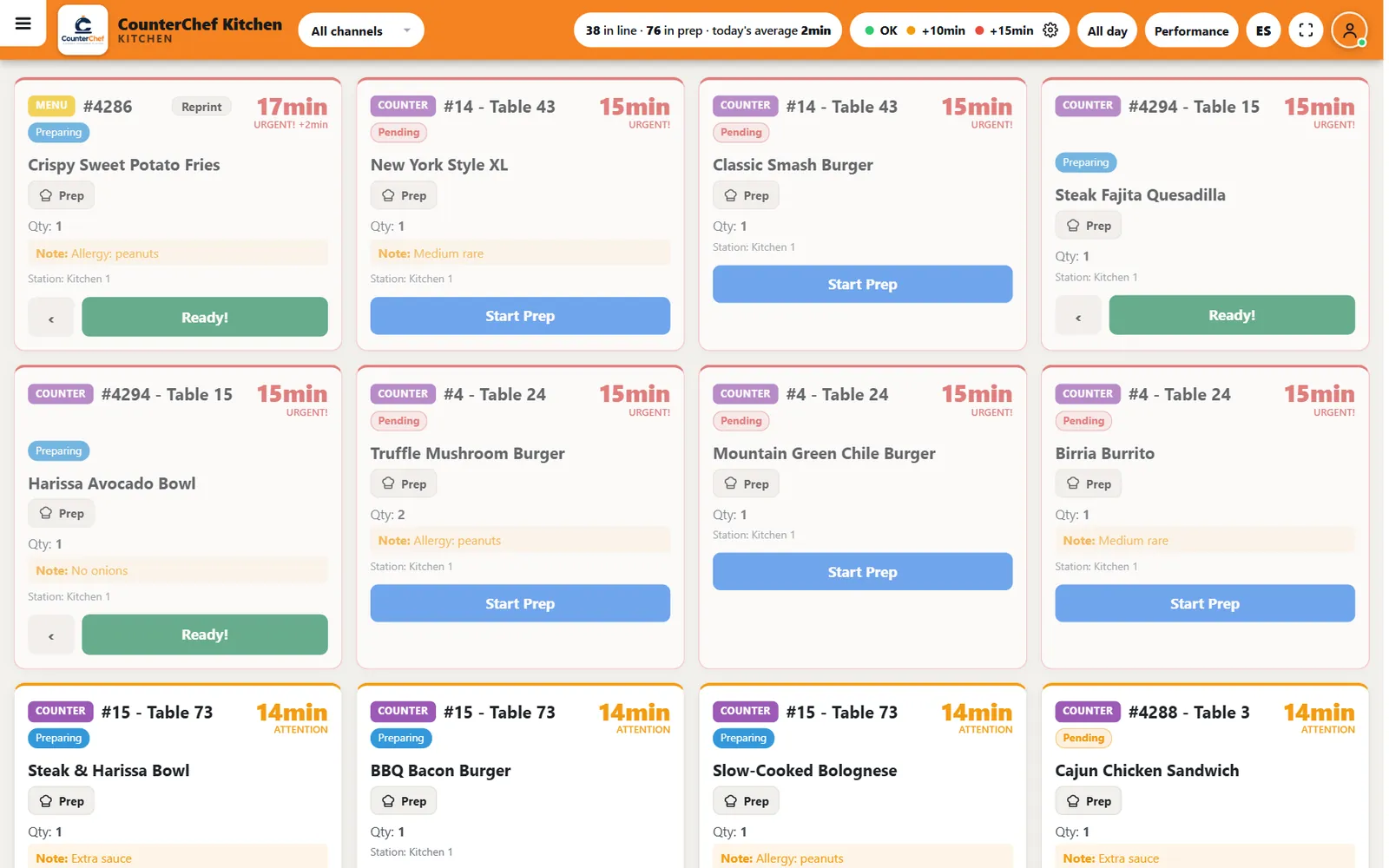
CounterChef's kitchen display shows live tickets, color timers, item notes, all-day counts and a performance view, with a one-tap switch between English and Spanish.
For an owner planning a transition, the practical question is how the available information fits the responsibilities of each station and the expo position. Evaluate the display against your actual menu, language needs, and service procedures rather than assuming that a particular screen arrangement will suit every kitchen.
The same rollout principles still apply: test the configuration, train the team, establish ownership, and validate the workflow during real service.
Frequently asked questions
What is a kitchen display system for restaurants?
A kitchen display system is a digital order-management interface used by kitchen employees to receive and manage incoming food orders.
Instead of relying entirely on printed tickets, the kitchen sees order information on screens. Depending on the system, that information can include menu items, modifications, preparation notes, timers, and order status.
The purpose is to organize kitchen communication and make outstanding work easier to manage.
It does not replace cooks, expo, food safety procedures, or the need for clear communication between the front and back of house.
Should a small independent restaurant replace all its paper tickets at once?
Usually, a gradual rollout is easier to manage.
Start with one station, test the configuration during real service, and fix problems before adding another station.
A small kitchen may have fewer stations than a large restaurant, but that does not make the transition automatically simple. Employees still need to understand order ownership, modifications, completion procedures, and technical fallback arrangements.
Keep paper available until the new process has been tested and the team can operate it reliably.
How long does it take to move from paper tickets to a kitchen display system?
There is no universal timeline.
It depends on menu complexity, the number of stations, the quality of existing menu configuration, staff experience, equipment installation, and the amount of training required.
A restaurant with a straightforward menu and two stations may have a simpler rollout than a restaurant with multiple preparation areas and extensive modifications.
Plan around operational readiness rather than an arbitrary deadline. The system should handle normal and busy service, exceptions, and technical interruptions before you consider the transition complete.
Can a kitchen display system eliminate kitchen communication problems?
No. It can make order information more organized and visible, but it cannot solve every communication problem.
Incorrect menu configuration, unclear modifiers, weak station ownership, inadequate training, and poor expo procedures can all continue after installation.
The best results come when the display is supported by clear responsibilities and consistent operating routines.
Treat the technology as one part of your kitchen management process. Keep reviewing mistakes, asking employees where information gets lost, and adjusting procedures when the same problems appear repeatedly.
Related feature: Kitchen display (KDS).