
Let guests see where their order is
Five clear steps answer the question your staff gets all night: where is my food?
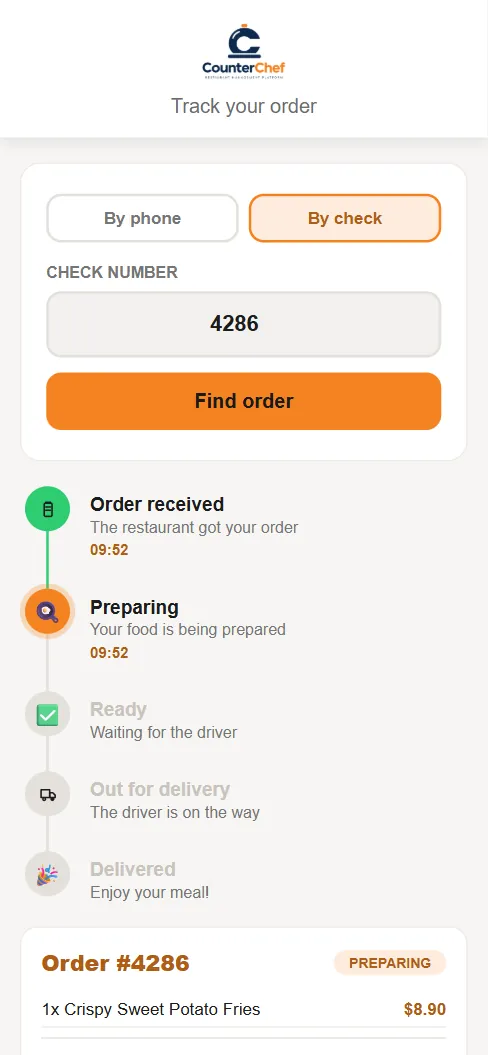
Every status call interrupts someone
The person answering "how much longer?" is usually the person who should be bagging the next order. A status page gives that answer without a call.
How it works
-
The guest opens tracking
Enter the check number and the page finds today's delivery order.
-
Status follows the kitchen and driver
Order received, Preparing, Ready, Out for delivery and Delivered change as your team works. The page updates every 20 seconds.
Buttons and rules that matter
- By check number
- Finds your delivery orders for the current business day.
- Order details
- Items and prices appear below the steps.
Order #4286
The guest sees Order received at 9:52 and Preparing right after, with one Crispy Sweet Potato Fries on the order, without calling the restaurant.
Connected to the rest of the system
Questions owners ask
Do guests get text messages?
No. CounterChef does not send SMS updates. Guests check the page.
Do they need an account?
No. The check number is enough.
See it with your own menu in mind
Tell us how your restaurant runs. We will walk you through the parts that matter to you.