
Build delivery routes from the orders waiting now
See what is pending and who is free, then select orders in the sequence the driver should run them.
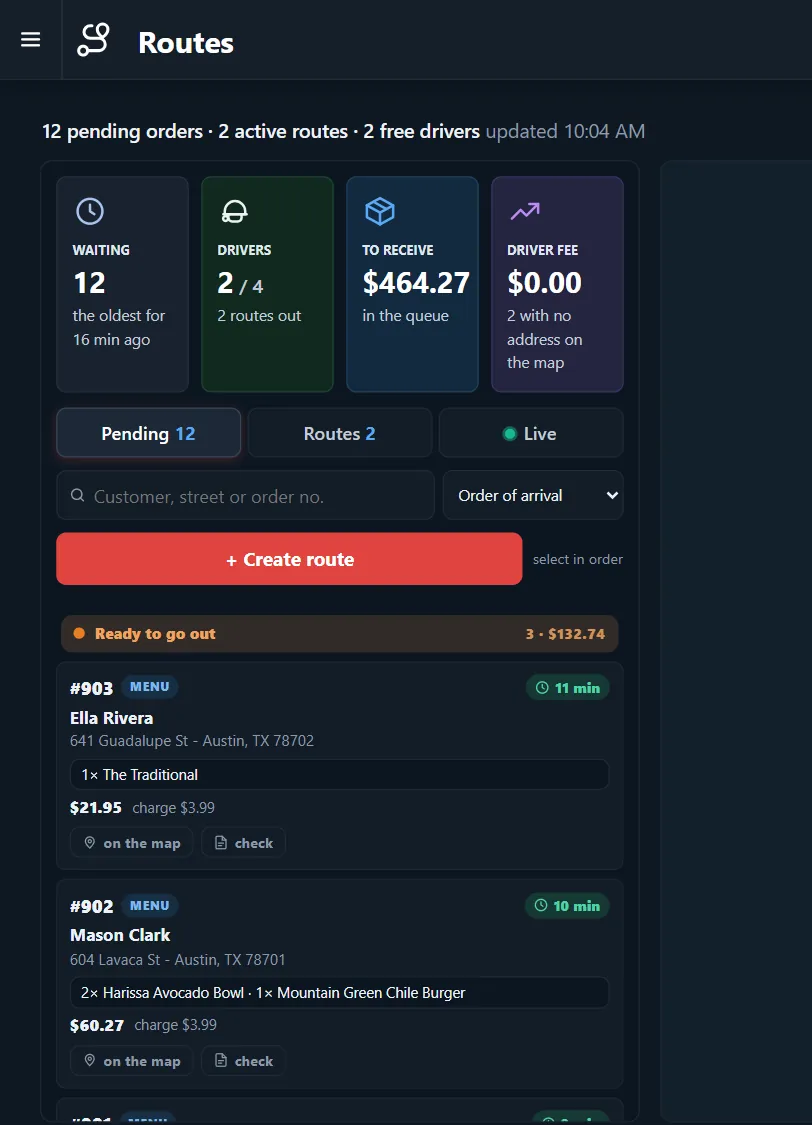
Two drivers, twelve orders, one decision
Sending orders out one at a time wastes trips. Holding them too long lets food get cold. You need the waiting time and the addresses side by side.
How it works
-
Read the queue
The top of the screen shows orders waiting, drivers out, money to collect and driver fees.
-
Select in order
Choose orders in the sequence you want and press Create route. Review the stops, reorder them and dispatch.
Buttons and rules that matter
- Pending
- Orders that are not on a route yet.
- Routes
- Runs already created.
- Search
- Finds a customer, street or order number.
- Sort
- Starts with order of arrival.
Twelve waiting
The oldest order has waited 16 minutes and three are ready to go. Two drivers are free, so the manager groups the ready orders by street and sends the first run.
Connected to the rest of the system
Questions owners ask
Does it choose the route for me?
You set the sequence by selecting orders, and you can change it before dispatch.
Do I need routes for every order?
No. You can still dispatch a single order directly.
See it with your own menu in mind
Tell us how your restaurant runs. We will walk you through the parts that matter to you.