
How to Choose a Restaurant POS: A Buying Scorecard for Independent Restaurant Owners
Choosing a restaurant POS system is not just a software decision; it affects how your staff take orders, how your kitchen receives tickets, how money moves through the business, and how much control you have over daily operations. Before signing a contract, score every system against the same practical requirements, ask the same questions, and make vendors explain exactly what happens when something goes wrong.
Start with the restaurant you actually operate, not the restaurant you hope to become
The first mistake owners make when researching how to choose a restaurant POS is shopping from feature lists. One system advertises inventory management, another emphasizes table service, and another focuses on payment processing. All three may be poor fits for your actual operation.
Start by documenting how your restaurant works today.
Write down:
- How customers order: at tables, at the counter, by phone, or through delivery.
- How many registers you need during a normal shift and a busy shift.
- How many employees take orders or handle payments.
- Whether servers split checks, transfer tables, merge checks, or apply discounts.
- How many kitchen stations receive orders.
- Whether you run separate menus for lunch, dinner, or special events.
- What information you need at closing.
- Which existing systems must exchange information with your POS.
Then identify the problems you want the new system to solve.
For example, if servers regularly write incorrect table numbers on tickets, table management deserves a high score. If your biggest problem is reconciling card deposits, payment reporting and settlement deserve more attention.
A POS should solve operational problems, not create new ones.
Use one buying scorecard for every vendor
Do not let each sales presentation determine what you evaluate. Prepare a consistent scorecard before scheduling demonstrations.
Give each category a score from 1 to 5:
- 1: Does not meet your requirements.
- 2: Requires significant workarounds.
- 3: Meets basic requirements.
- 4: Works well with minor limitations.
- 5: Demonstrably fits your operation.
Multiply each score by the category's weight to calculate its weighted result.
| Category | Weight | What you are evaluating |
|---|---|---|
| Ordering and register workflow | 20% | Speed, accuracy, ease of use |
| Kitchen communication | 15% | Ticket routing, modifications, timing |
| Payments and processing | 15% | Fees, settlement, payment flexibility |
| Reporting | 10% | Sales, labor, discounts, reconciliation |
| Hardware and ownership | 10% | Equipment costs, control, replacement |
| Contract and cancellation | 10% | Commitment, renewal, termination |
| Support and reliability | 10% | Help availability, outages, recovery |
| Setup and training | 5% | Installation, migration, staff training |
| Integrations and future needs | 5% | Accounting, payroll, other systems |
| Total | 100% |
A system that scores well overall but fails a critical requirement should not automatically win.
For instance, if a restaurant cannot operate during an internet interruption and that creates an unacceptable business risk, treat that as a disqualifying issue rather than allowing strong reporting features to compensate.
Ask vendors to demonstrate your busiest 30 minutes
A polished demonstration is easy to deliver when the salesperson controls the menu and the order sequence.
Instead, bring a realistic shift scenario.
Ask the representative to demonstrate the following:
- Open a table and enter an order.
- Add a modifier, such as no onions or sauce on the side.
- Send the order to the correct kitchen station.
- Add another item after the original ticket has been sent.
- Move a customer to another table.
- Split a check between two guests.
- Merge two checks.
- Apply a manager-authorized discount.
- Void an incorrect item and show where that action appears in reporting.
- Close the transaction and show how the payment is recorded.
For counter service, repeat the exercise with a customer placing multiple orders, changing an item, and paying separately.
Watch how many screens the employee must navigate. Notice whether the system requires repeated confirmation, whether modifiers are clear, and whether mistakes are easy to correct.
One useful test is to ask someone who has never seen the system to complete a simple order after a short explanation. Observe where they hesitate.
Do not accept a demonstration that skips difficult steps because they are supposedly uncommon. Those are precisely the steps that become expensive during a busy shift.
Make payment processing terms part of the buying decision
Payment processing deserves its own evaluation because the POS interface and the company processing your card transactions may have different commercial terms.
Ask these questions:
- Who actually processes the card payments?
- Is the processor selected by the POS provider, or can you choose your own?
- Is processing priced as a percentage, a per-transaction amount, or both?
- Are debit and credit transactions priced differently?
- Are keyed transactions charged differently?
- Are there monthly processing, statement, gateway, or compliance-related fees?
- Are chargebacks or retrieval requests subject to additional charges?
- How frequently are deposits made?
- Are weekends and holidays handled differently?
- Can processing rates change during the contract?
- What happens to pending settlements if you terminate the agreement?
Ask for the complete processing agreement, not just a sales representative's explanation.
Also request a sample merchant statement and have the representative walk through every line.
A low advertised rate can be misleading if additional fees apply. Compare the actual expected processing cost using your own transaction mix.
Worked example: Compare two hypothetical processing arrangements
Suppose your restaurant processes $60,000 in card payments each month.
All figures below are hypothetical and are provided only to demonstrate the calculation.
Arrangement A:
- Monthly card volume: $60,000.
- Processing percentage: 2.60%.
- Per-transaction fee: $0.10.
- Monthly transaction count: 1,200.
- Additional monthly account fee: $25.
Calculation:
- Percentage charge: $60,000 × 2.60% = $1,560.
- Transaction charges: 1,200 × $0.10 = $120.
- Account fee: $25.
- Total monthly processing cost: $1,705.
Arrangement B:
- Monthly card volume: $60,000.
- Processing percentage: 2.45%.
- Per-transaction fee: $0.15.
- Monthly transaction count: 1,200.
- Additional monthly account fee: $40.
Calculation:
- Percentage charge: $60,000 × 2.45% = $1,470.
- Transaction charges: 1,200 × $0.15 = $180.
- Account fee: $40.
- Total monthly processing cost: $1,690.
Arrangement B costs $15 less per month under these hypothetical assumptions.
However, do not make your decision on this difference alone. Check the contract, settlement timing, additional charges, and whether the quoted rates apply to your actual card mix.
Find out who owns the hardware before signing
Hardware ownership is one of the easiest contract details to overlook.
A POS provider might sell equipment, lease it, bundle it into a subscription, or supply it under an agreement with restrictions.
Ask:
- Do we own the equipment after purchase?
- Is any equipment leased or rented?
- Can we use the equipment with another POS system?
- Who owns the payment terminals?
- Can we replace a damaged tablet ourselves?
- Are there restrictions on operating systems or device models?
- Who pays for repairs and replacement?
- What happens to the equipment when we cancel?
- Are there return deadlines or restocking charges?
- Can we retain our purchased equipment after termination?
Request an itemized hardware list with ownership clearly identified.
Do not assume that paying a monthly hardware-related charge eventually gives you ownership.
Also consider the operational consequences of proprietary equipment. If a terminal fails on Saturday night, you need to know whether you can obtain a replacement quickly or must wait for the provider.
A practical exercise: ask the salesperson to identify every physical component required to run your restaurant, from the order-taking device to the receipt printer and payment terminal.
Then ask what happens if each component stops working.
Read the contract as carefully as the feature list
A restaurant POS contract can create problems long after the installation is complete.
Ask every vendor the same contract questions:
Contract length
- Is the agreement month-to-month, annual, or multi-year?
- When does the commitment begin?
- Does the term start at signing, installation, or activation?
Renewal
- Does the agreement renew automatically?
- How much notice must we give to prevent renewal?
- Is there a deadline for sending cancellation notice?
Cancellation
- Can we terminate for convenience?
- Is there an early termination fee?
- Are outstanding hardware obligations payable immediately?
- What happens if the system repeatedly fails to meet agreed requirements?
Price changes
- Can subscription charges increase during the contract?
- Can payment processing rates change independently?
- Are additional locations, registers, or users subject to different charges?
Data
- Can we export transaction history and sales reports?
- What format will the files use?
- How long can we access our data after cancellation?
- Are there fees for exporting or transferring information?
Get important promises in writing.
A verbal assurance that you can leave whenever you want is not a substitute for reading the termination clause.
Have an attorney review agreements with substantial commitments or unclear provisions. Contract requirements and applicable protections can vary by state.
Test what happens when the internet or equipment fails
A POS system should be evaluated under imperfect conditions, not just during a successful demonstration.
Ask the vendor to explain and demonstrate:
- Whether orders can still be entered during an internet interruption.
- Whether card payments can be accepted offline.
- Whether offline transactions carry additional risk or restrictions.
- How transactions synchronize after connectivity returns.
- What happens if a printer stops working.
- Whether employees can continue taking orders if one register fails.
- How frequently data is backed up.
- How the business recovers after a power interruption.
Be especially careful with offline payment claims. Accepting a payment without a live authorization can create different risks from processing an approved transaction. Ask who bears the risk if the transaction is later declined.
A useful test this week is to run a 15-minute outage drill during a quiet period. Disconnect a nonessential test device or simulate a printer failure without interrupting live payments. Ask employees how they would keep orders organized.
Record how long it takes to restore normal operations.
That exercise will reveal whether your staff understand the fallback procedure or simply assume the equipment will always work.
Evaluate reporting by asking what decisions it helps you make
A POS can produce dozens of reports without answering the questions an owner actually needs.
Ask the vendor to show you how to retrieve:
- Daily sales by payment method.
- Sales by menu item.
- Sales by employee.
- Discounts and voids.
- Refunds and chargebacks.
- Tax collected.
- Tips recorded.
- Open checks.
- Sales by service period.
- End-of-day reconciliation information.
Then ask whether reports can be exported and whether historical information remains accessible.
Try a specific scenario:
You finish a Friday dinner shift and discover that the register's reported sales do not match the amount expected in the bank deposit.
Can you identify cash sales, card sales, refunds, tips, and processing deductions separately?
Can you trace a discrepancy to an individual transaction?
Can your bookkeeper retrieve the necessary information without asking you to manually reconstruct the shift?
The best reporting system is one that helps you investigate problems quickly, not one that simply produces attractive charts.
Make support prove its value before you need it
Ask the vendor:
- Is support available during our operating hours?
- Is there phone support?
- Is support available on weekends and holidays?
- What issues are handled by the first support representative?
- When is an issue escalated?
- Is emergency support included?
- Are hardware repairs handled separately?
- Is there a written process for reporting outages?
Do not settle for a vague promise of round-the-clock support without understanding what it means.
Ask the representative to describe the procedure for a payment terminal failure during a Saturday dinner service.
Who do you contact? What information must you provide? What temporary procedure should employees follow?
Also ask whether you can speak with a technical support representative before signing.
Sales representatives are there to sell. You need to know what happens when you become a customer with a problem.
Try three practical buying tests this week
These exercises help owners evaluate systems using their actual operating conditions.
1. Create a POS mistake log.
For three shifts, record every order-entry problem that costs time or requires a correction.
Include the time, mistake, employee action, and operational consequence.
Examples include incorrect modifiers, forgotten items, duplicate tickets, and misapplied discounts.
Use that log to build your demonstration script. Require each vendor to show how its system handles your five most common mistakes.
2. Run a shadow closing.
Give two employees the same hypothetical closing figures and ask them to reconcile the shift independently using the POS reports.
Compare their results.
If they cannot agree on card totals, refunds, discounts, and cash deposits, investigate whether the reporting process is unclear or the employees need better training.
This also gives you a practical way to test the reports during vendor demonstrations.
3. Calculate the cost of switching, not just the cost of buying.
List the time required to transfer menus, configure taxes, train employees, update procedures, and replace incompatible equipment.
Assign a hypothetical labor cost to each task.
A system that looks inexpensive on paper may require substantial management time to implement.
These three exercises also help prevent a salesperson from steering the conversation toward features that do not solve your actual problems.
Use this ready-to-copy vendor questionnaire
Send the same questions to every provider before making your final decision.
| Question | Vendor answer |
|---|---|
| What is the contract length? | |
| Does the contract renew automatically? | |
| What notice is required to cancel? | |
| Are there early termination charges? | |
| Who owns each hardware component? | |
| Can purchased hardware be reused elsewhere? | |
| Who processes card payments? | |
| Can we select our own processor? | |
| What are all processing charges? | |
| When are card deposits settled? | |
| Can we export our complete sales history? | |
| What happens during an internet outage? | |
| What happens if a payment terminal fails? | |
| Is support available during our operating hours? | |
| Are installation and training included? | |
| Can we test our actual service workflow? |
Ask vendors to answer in writing.
If a representative cannot answer a question, mark it as unresolved rather than assuming the answer will be favorable.
Keep the completed questionnaires alongside the contracts and demonstrations. That gives you a record of what was promised and makes comparisons much easier.
Choose the system that fits your operation and leaves you in control
After completing the scorecards, eliminate systems that fail your essential requirements.
Then compare the remaining options using three additional questions:
- Can my employees operate this system confidently during a busy service?
- Can I understand and control the complete financial relationship, including processing and hardware?
- Can I leave the arrangement without losing access to essential business information or equipment I own?
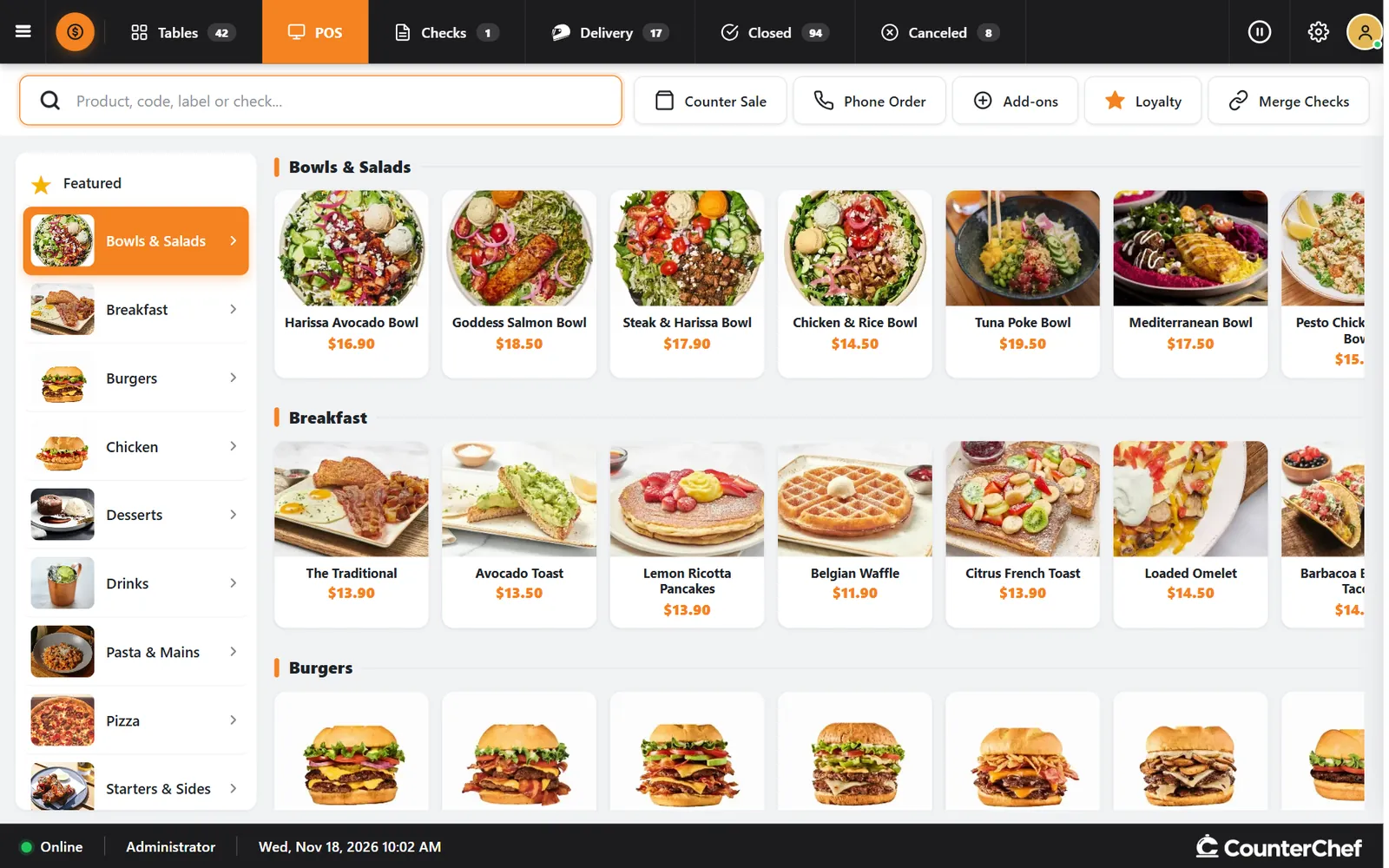
If you are still comparing options, CounterChef is worth a look. It runs on an iPad, Android tablet, iPhone or computer, so no special hardware has to be bought; CounterChef charges no fee on payments, while a processor such as Stripe charges its own; and it includes table map, counter sales, phone orders, merged checks and delivery in one register.
The final decision should come from the demonstration, written terms, and actual operating requirements, not from the most persuasive presentation.
Frequently asked questions
How long does it take to choose a restaurant POS system?
Allow enough time to document your requirements, compare written proposals, run demonstrations, review contracts, and test the preferred system. The timeline varies with restaurant size, operational complexity, and implementation requirements. Avoid rushing a decision simply because a vendor offers a limited signing window.
Should I buy my own POS hardware or use equipment provided by the vendor?
It depends on the equipment terms, compatibility, support arrangements, and total cost of ownership. Buying hardware can give you more control, but you must understand who handles repairs and replacements. Vendor-provided equipment may simplify support, but check whether it is leased, restricted, or required to be returned when you cancel.
Can I change POS providers without losing my restaurant's sales history?
That depends on your agreement and the provider's data export policies. Before signing, confirm that you can export transaction history, sales reports, menu information, and other records in usable formats. Ask how long access remains available after termination and whether export assistance carries additional charges.
What is the most important question to ask before signing a POS contract?
Ask what your complete financial and operational obligations will be if you decide to leave. Get clear answers about contract length, automatic renewal, cancellation penalties, hardware ownership, payment processing, and data access. Have an attorney review unclear contractual language and confirm any relevant state or local requirements before committing.
Related feature: Restaurant POS.